Systec Connect DS How to test the system for free for 100 cycles

Your new Systec autoclave already comes equipped with Systec Connect DS. The documentation system is activated free of charge for the first 100 sterilization cycles.

Systec Connect Software: Autoclave Monitoring on Smartphones, Tablets, and PCs

What do you need to do that?

The feature is enabled by default and can be used immediately. All you need is access to a working browser and an Ethernet connection. No additional software is required.

Connect your autoclave to your network and access your process data via a browser or app in just a few minutes.

Here's how easy it is to activate the system

In just a few steps, you can view the current device status, process data, and other information about your autoclave directly in your browser or via the Systec Connect app. Systec Connect DS operates as a read-only system—process data can be viewed but not modified.

Step 1

Connecting Autoclaves to the Network

Connect your Systec autoclave to your internal network via the built-in Ethernet interface.

Step 2

View the IP address on the device

Open the system information on your autoclave's display and write down the IP address shown.

Step 3

Open browser

Connect your PC or tablet to the same network. Then enter the IP address of your autoclave into your browser's address bar. No additional software is required.

Systec Connect DS EN

Here's what you can use during the trial period

Even during the free 100 cycles, you'll have access to the most important features of Systec Connect DS:

  • Live Monitoring of Your Autoclaves
  • Process memory
  • Error Log
  • Device Information
  • Browser-based access
  • Read-only access without interfering with running processes
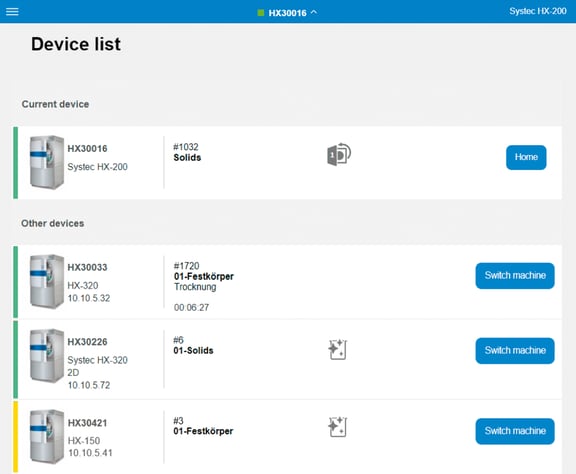
  • Overview of All Devices on the Network

Access is also available through the free app

Alternatively, you can easily open Systec Connect DS using the free Systec Connect app.

The app detects the autoclave on the network and automatically opens the browser with the correct IP address.

What happens after 100 cycles?

Once the free 100 sterilization cycles have expired, you can continue using the Systec Connect DS option for a fee. Please contact us after the trial period!

Simplifying Day-to-Day Lab Operations with a Process Overview Using Systec Connect Software

Standard Features

Icon_Compatibility

Ethernet Interface

Network connection (LAN) via RJ45 Ethernet

More Information
Systec Connect Software: Internal Storage of Process Data

Internal memory

Internal storage of process data (at least 10 years)

Systec Connect Software: Flexible Data Export as PDF or CSV

Electronic Data Output

Export as PDF/CSV via USB or network

Compatibility with Systec Autoclaves

Compatibility

with the Systec DX, VX, and HX series

Free Systec Connect App

Mobile App

Free app for iOS & Android

Optional

Icon_Temperature-Pressure

Systec Connect DS

Read-only access to all Systec autoclaves

More Information
Autoclaves with Wi-Fi

Wi-Fi connectivity

Wi-Fi Connection for the Autoclave

Systec Connect Software with Save-to-Folder Feature

Save-to-Folder

Automatic Data Export (STF) 

More Information
Systec Connect Software: Advanced Feature for 21 CFR Part 11 Compliance

Advanced 21 CFR Part 11

Audit Trail, Electronic Signatures, and Advanced User Accounts

More Information
Systec Connect Interface for External Software Integration

OPC-UA Interface

For integration with external software systems such as LIMS or SCADA

FAQ

No. You can access it directly through a modern web browser.

No. The autoclave and your device simply need to be on the same internal network.

No. Systec Connect DS operates as a read-only system. Process data can be viewed but not modified.

Personal Contact for Sytec Autoclaves, Mediafill, and Media Preparators


has it piqued your interest?

All autoclaves at a glance — we'll find the best solution for you.